
1. Choose a cross-cutting check or transformation
Middleware is useful for logic that runs before or after configured endpoints, functions or events. Begin with one narrow task, such as checking a required named input or adding a non-sensitive source label to an input object. Avoid changing workspace defaults for the first experiment.
Use an ordinary custom function when the caller should choose an explicit command in its workflow. Middleware has execution-order and inheritance effects that require separate review. Endpoint authentication and API limits still protect the request before its workflow middleware; middleware is not a replacement for them.
2. Create and inspect the fixed inputs
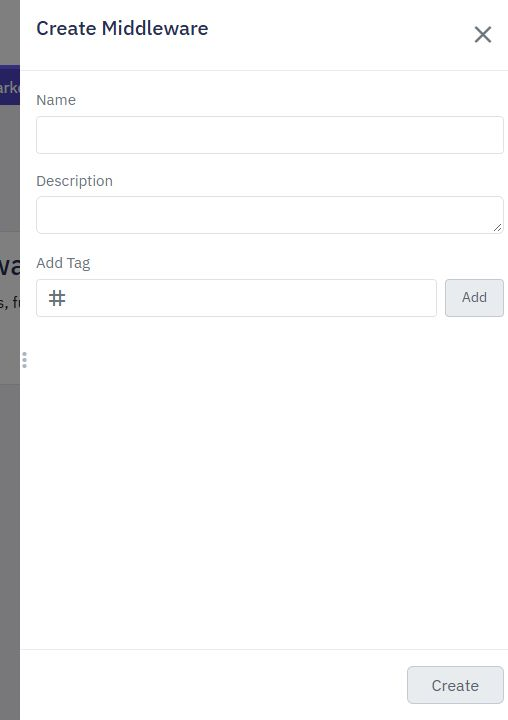
Open Middleware → Create Middleware and name the test workflow clearly. The editor provides vars and type inputs. Before middleware receives the workflow's named inputs; after middleware receives its result. The type indicates pre or post execution.
Use the value selector for the actual nested input path. If the endpoint has a Body input, inspect that input's configured name rather than assuming the value is directly at vars.name. Start with synthetic values and no external side effects. Watch reusable middleware for the editor flow.
3. Choose merge, replace and failure behavior
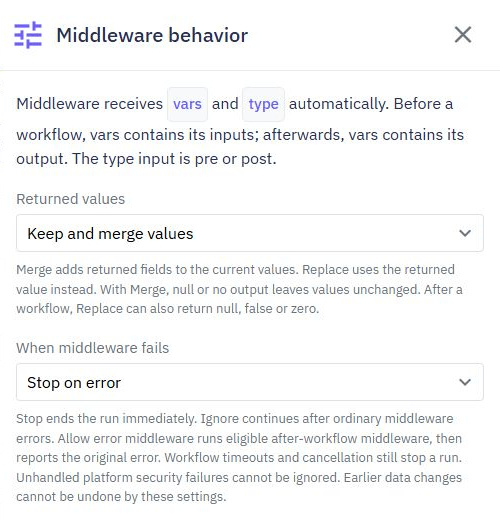
Open Behaviour. Keep and merge values adds returned fields to the existing object and replaces matching keys. Replace values makes the middleware's output the complete new input or result. Before middleware that replaces inputs must preserve all required inputs in its returned object.
A check-only middleware can leave output unset with merge behavior so it does not alter the values. Replacement can intentionally produce null, false or zero after a workflow; test those cases rather than treating them as missing. Choose whether an error stops execution. Never continue after a failed permission check merely to keep the interface looking successful.
4. Attach it to one test workflow first
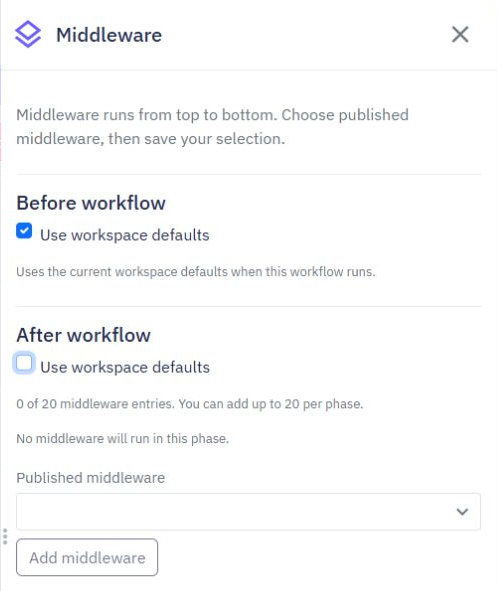
Test and publish the middleware, then open a dedicated endpoint's middleware configuration. Set before and after lists separately. A custom list replaces the defaults for that section; it does not append to them. An explicitly empty custom list means no middleware for that phase.
Enable the intended entry, review its order, save and publish the endpoint. Use a read-only synthetic endpoint initially so an ordering mistake cannot send messages or mutate business records. Check the trace to establish which entries ran. Adding middleware in the library alone does not attach it to a workflow.
5. Review defaults as a broad operational change
Workspace defaults are configured by workflow type. Changing saved defaults can affect published workflows that inherit them, so list affected endpoints, functions and events before doing it. Keep the first guide exercise attached only to the test workflow.
When using a post middleware, remember it runs after the workflow result is ready; it cannot undo a message already sent or a completed database write. For database-trigger events, checks surround the event after the original record mutation. Validate the original mutation in its own workflow when it must be prevented.
6. Verify transformations and rejected inputs
Test valid input, missing input and a deliberate middleware error. Compare input reaching the endpoint commands, the final response and its execution trace. Add a second harmless transformation in a test copy to verify ordering and matching-key behavior.
Check inherited defaults, a custom list and a custom empty list as separate cases. Test merge and replacement explicitly, including false or null when supported by the phase. Use API workflow tests and debugging before considering wider use. The screenshots show controls and documented examples, not a newly applied workspace policy.
Go deeper
Supporting documentation
Find the configuration details and reference material behind this page.