

Move beyond a screen full of sample data
A useful application needs somewhere to keep records and rules for changing them. A customer portal needs accounts. A task tracker needs tasks that belong to the right person. A document workflow needs stored files and a way to retrieve them.
Twidget brings these backend building blocks into a workspace. Create tables, build workflows that read or change their records, and expose the actions your frontend needs through an API. You can use Twidget’s page builder for the interface or connect a separate frontend. Start with the smallest complete workflow, then add the next feature around the same data.
Start with the records your application owns
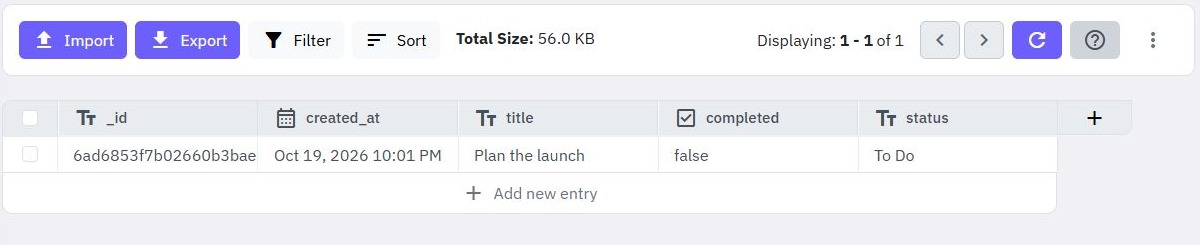
Create database tables with typed fields, then add and inspect rows in the workspace. For a task application, separate customer accounts from task records, give each task a title and status, and record who owns it. That ownership becomes part of the rules your API must enforce.
Database commands let workflows create, read, update and delete data. Generate CRUD endpoints as a starting point, then adjust them to match the application’s actual permissions and response format. If you already have a dataset, the CSV-to-API guide provides another starting point. Plan field types and check imported values before building workflows around them.
Connect customer accounts to the right data
An authentication table supports account workflows such as signup, login, logout and password recovery. Generated authentication endpoints provide configured inputs and commands that you can inspect and adapt.
Keep identity and access rules connected. A customer who signs in should only receive the records your application allows them to see. For a personal task tracker, use the authenticated customer’s identity to filter records, and check ownership before updating or deleting a task. Hiding a control on the page is not an access check on the backend. Follow the authentication guide and test with separate sample customers.
Add the work that happens around a request
- Files: manage files and folders through the File Manager and workflow commands. Add an upload endpoint when your app needs documents or attachments.
- External services: send HTTP requests from a server workflow and use the returned status and data in subsequent commands.
- Scheduled events: run a command sequence once at a chosen time or on a recurring schedule.
Keep these workflows focused. An attachment upload needs decisions about accepted files and who can retrieve them. A recurring job needs a clear outcome and a way to check failures. The file upload guide and scheduled workflow guide cover those next steps.
Understand the workflow before you depend on it
Use Run & Test to supply inputs, inspect outputs and add assertions. Optional execution tracing helps you follow the command sequence and find a failing step. Review the published version of each workflow and test real requests before connecting it to a public interface.
Twidget is a practical option when your product can be expressed as tables, requests and command workflows. You remain responsible for your data model, authorization rules, external service requirements and expected usage. Check plan allowances against your workload rather than assuming unlimited storage or execution.
For a complete first project, follow the task-management app guide. If your interface already exists, start with the API builder and implement one action it needs.
Go deeper
Supporting documentation
Find the configuration details and reference material behind this page.