

1. Agree on the JSON your component will read
Your React application can call a published Twidget endpoint using the browser's fetch API. This guide builds a read-only task list so you can verify the connection without a form changing data on every attempt. You need a working React application, access to a Twidget test workspace and a published GET endpoint containing public, synthetic tasks.
The component expects a JSON array. Every item must contain string fields _id, title and status. Review the endpoint's Output and database command's returned fields to match that contract, or deliberately adapt the component to your verified response. This is an example response:
[
  { "_id": "sample-001", "title": "Plan the launch", "status": "To Do" }
]
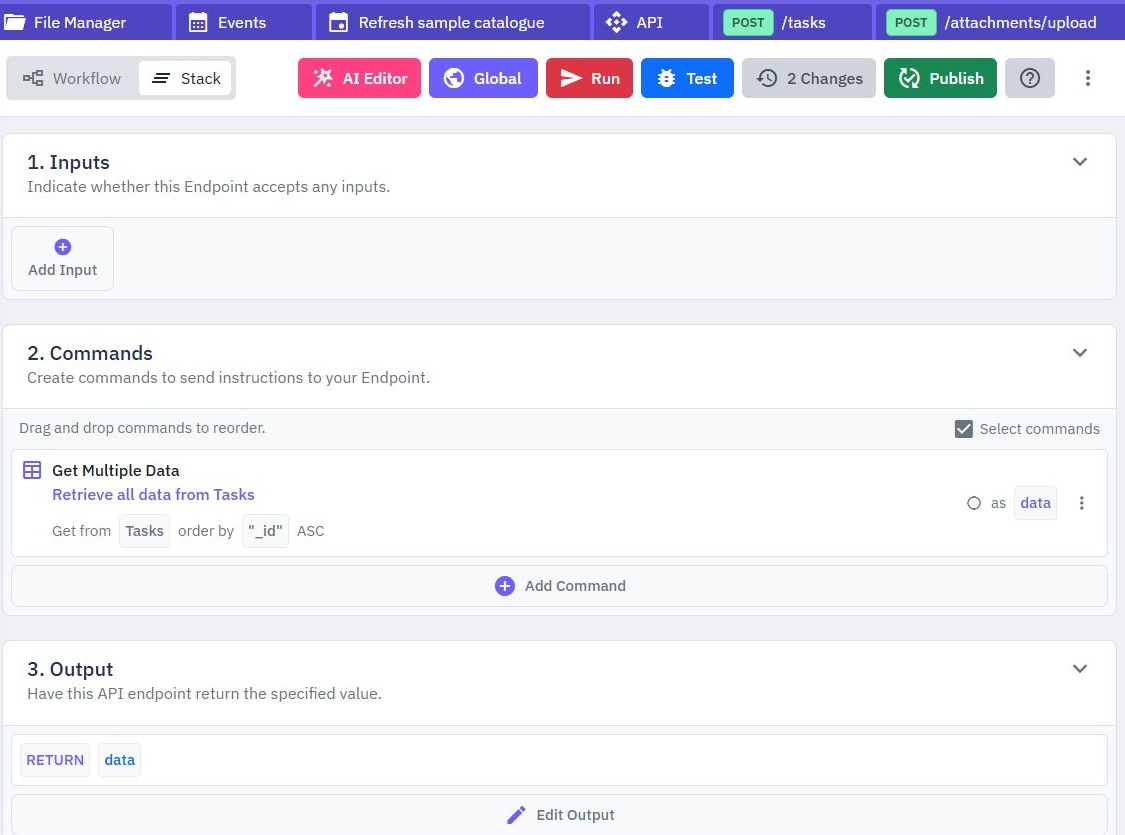
Use Get Multiple Data to retrieve the collection, then return it from the endpoint. Select the fields the frontend needs and inspect the result through the API client before writing client code. The CRUD guide explains how to start from an existing table.
2. Allow the intended frontend origin
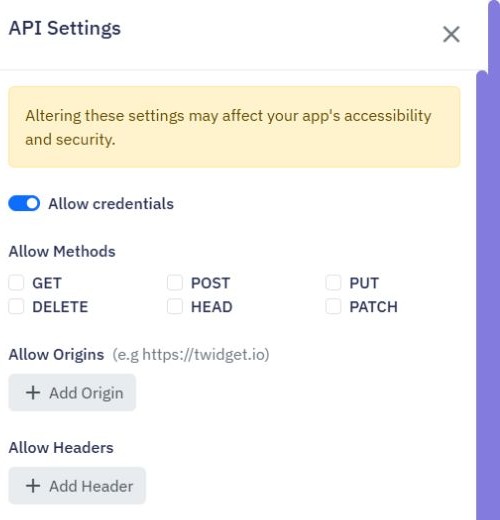
On the API page, open Settings. Review Allowed Origins, Allowed Methods and Allowed Headers. For a React app actually running at http://localhost:5173, allow that exact origin and the GET method used here. Substitute your own port when different; scheme, hostname and port are all part of an origin.
For a deployed app, add its exact HTTPS origin as a separate intentional entry. Avoid a wildcard as a shortcut for a private application. These settings affect the workspace, so review existing consumers before changing them. The documentation describes changes as taking effect immediately.
This read-only request sends Accept: application/json and no credentials. A later JSON POST needs the appropriate method and Content-Type permission. A bearer-authenticated call needs Authorization allowed and can cause a browser preflight. Inspect the browser's network error rather than treating every failure as an incorrect token.
CORS controls what browsers permit a page to read; it is not authorization. Keep endpoint authentication and record ownership in the backend. Do not enable Allow Credentials merely to make this anonymous example work; cookie-based designs need a deliberate credentials policy.
3. Put the full endpoint URL in app configuration
Copy the published GET endpoint address shown in your workspace. This example uses Vite's environment-variable syntax. In an existing Vite React app, add this to .env.local, replacing the placeholder with the complete address, then restart the development server:
VITE_TWIDGET_TASKS_URL=https://YOUR_WORKSPACE_API_HOST/tasksThis is configuration, not a secret. Vite exposes variables prefixed VITE_ to the browser bundle. Never put an administrative API key, webhook signing secret or privileged bearer token here expecting it to remain private. Other React toolchains have their own conventions; adapt the lookup instead of copying Vite syntax into another framework.
For private tasks, first implement the customer authentication flow. Attach the current customer's session token deliberately and enforce ownership server-side. The component below uses a public synthetic endpoint and does not implement login, credential storage or session refresh.
4. Add loading, error and empty states
Save this component as TaskList.jsx, import it into your existing app and render <TaskList />. It checks the HTTP result and validates the response before rendering. Server response text is not displayed as a raw error message.
import { useEffect, useState } from 'react';

const endpoint = import.meta.env.VITE_TWIDGET_TASKS_URL;

export default function TaskList() {
  const [tasks, setTasks] = useState([]);
  const [loading, setLoading] = useState(true);
  const [error, setError] = useState('');

  useEffect(() => {
    const controller = new AbortController();
    let active = true;
    async function load() {
      try {
        if (!endpoint) throw new Error('Missing endpoint configuration');
        const response = await fetch(endpoint, {
          headers: { Accept: 'application/json' },
          signal: controller.signal
        });
        if (!response.ok) throw new Error('Request failed');
        const data = await response.json();
        if (!Array.isArray(data) || data.some(task =>
          !task || typeof task._id !== 'string' ||
          typeof task.title !== 'string' || typeof task.status !== 'string'
        )) throw new Error('Unexpected response');
        if (active) setTasks(data);
      } catch (cause) {
        if (active && cause.name !== 'AbortError') {
          setError('Tasks could not be loaded. Please try again later.');
        }
      } finally {
        if (active) setLoading(false);
      }
    }
    load();
    return () => { active = false; controller.abort(); };
  }, []);

  if (loading) return <p role="status">Loading tasks…</p>;
  if (error) return <p role="alert">{error}</p>;
  if (tasks.length === 0) return <p>No tasks yet.</p>;
  return (
    <ul>
      {tasks.map(task => (
        <li key={task._id}>{task.title} — {task.status}</li>
      ))}
    </ul>
  );
}
Cleanup aborts the fetch and prevents a stale request from updating state after unmount. React's official Effect fetching guidance explains cleanup and why development checks can run setup more than once. For a larger app, use your framework's data-loading facilities or an appropriate request cache rather than duplicating ad hoc Effects throughout the component tree.
The component renders task text normally through JSX. It does not inject API values as HTML. Its key uses the server identifier, so return a stable unique identifier for every task.
5. Check the request in the browser
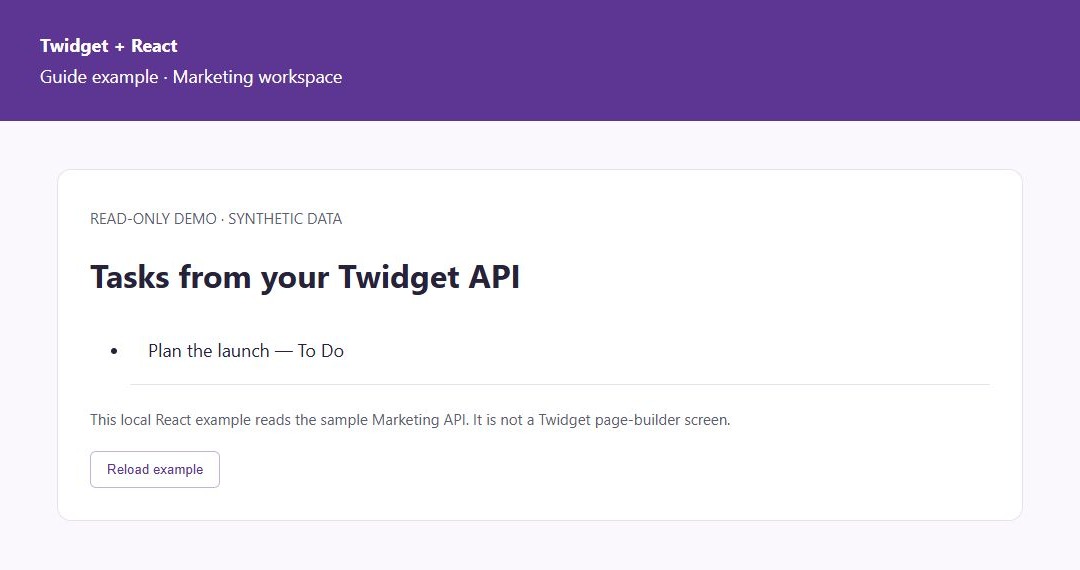
In the demonstrated example, this React component ran locally and read the public synthetic task endpoint in the Marketing workspace. It displayed Plan the launch — To Do from the endpoint’s array response. This is a React interface connected to Twidget, rather than a page made in the Twidget page builder.
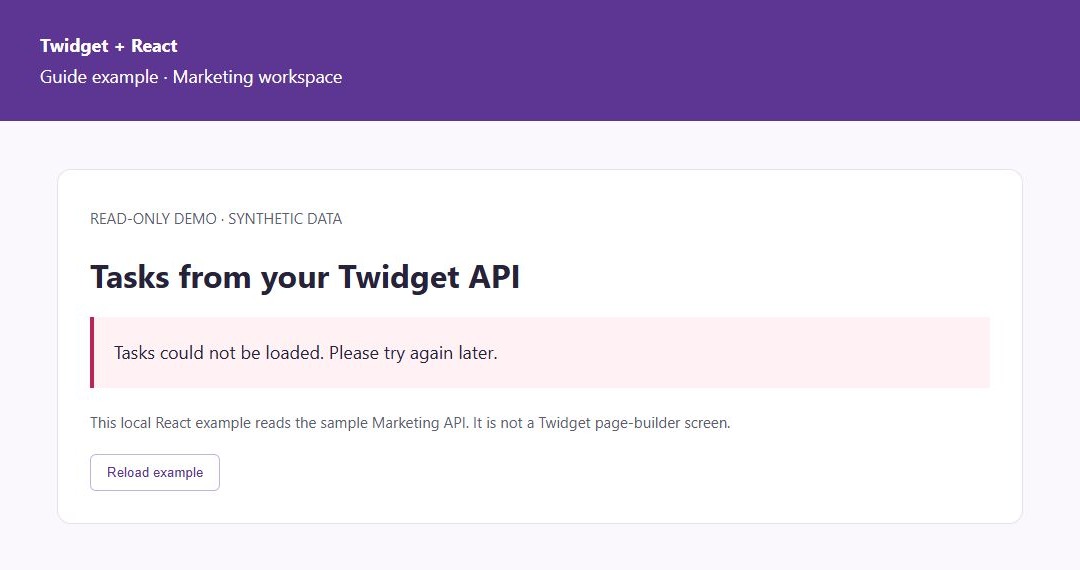
A second request to a nonexistent route exercised the failure path and displayed Tasks could not be loaded. Please try again later. No CORS settings were changed for either demonstration. The captured settings show the workspace’s existing permissive configuration, including Allow Credentials enabled; use the intended-origin policy above when configuring your own application, rather than copying those defaults.
For your own connection, inspect the list together with the browser’s Network panel. Confirm the request reaches the intended workspace URL and returns the agreed JSON. Also check an empty collection, a non-successful response and a successful response with the wrong shape using safe test data or a local mock. The empty-data and private-authentication paths were not demonstrated by these two captures.
If the API client works but the browser does not, compare the page’s exact origin with Allowed Origins and inspect any preflight. If HTTP succeeds but the component shows an error, compare the expected array with the actual response. If you see old backend behavior, check the published version.
With React development Strict Mode, an initial setup-and-cleanup cycle can produce an extra cancelled read. Do not remove cleanup to hide it, and do not move create, purchase or delete operations into this mount Effect. Stop or throttle a safe test request and navigate away when checking cleanup in your own app.
6. Add writes after the read path works
For a create-task form, send the POST request in its submit handler, show a pending state and keep the user's input until success is confirmed. Map form field names to the endpoint's actual body inputs. The existing example uses generated fields such as i_title and i_status; a frontend property named title is not automatically equivalent.
Add server rules using the validation guide before exposing writes. After a successful mutation, refresh the read operation or update your request cache deliberately. Check unauthenticated and cross-account requests for a private app.
You can combine a React interface with incoming webhook events, but a webhook receiver does not automatically push updates into this component. Decide how the frontend refreshes data. Explore the no-code backend overview for the storage and workflow pieces.
Go deeper
Supporting documentation
Find the configuration details and reference material behind this page.