

1. Write down accepted and rejected requests
A frontend can make valid input easy, but callers can bypass it and send HTTP requests directly. Backend validation keeps acceptance rules in the workflow that would perform the action. Begin by deciding which requests are valid and what a rejected request must prevent.
This guide examines the synthetic receiver from the webhook guide: POST /examples/receive-webhook, with one JSON body object containing event_id and type. It accepts task.created and returns {"received":true}. The demonstration has no database writes, external calls or real provider connection.
Its valid sample is:
{
  "event_id": "evt_demo_001",
  "type": "task.created"
}
Separate the rejection cases: no body, a missing nested field, a present but unsupported type, and a caller who is not permitted to act. These have different causes and may need different rules. The REST API guide covers endpoint and database setup when you extend this pattern to records.
2. Configure input requirements
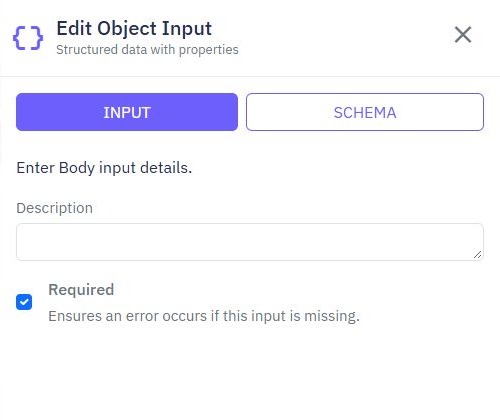
In endpoint inputs, select Add Input → Body. The editor creates one whole-object $body input. In INPUT, review Required. In SCHEMA, use Object → Single and add text fields event_id and type.
Commands read nested values using $body.event_id and $body.type. Requiring the body is different from proving that each field is populated or accepted. Do not infer a complete business policy from the Required checkbox or a schema field name. Test missing fields and add explicit acceptance expressions where needed.
The demonstrated rule below checks the event type only. It does not prove that an event ID is non-empty, unique or authentic. Add and test those policies separately before relying on them. Similarly, a title input in another API may need an explicit rule for whitespace or maximum length even when a request body is required.
A browser's required attribute improves a form but does not replace endpoint validation. This applies equally to a Twidget page and a React frontend.
3. Put Validate before dependent actions
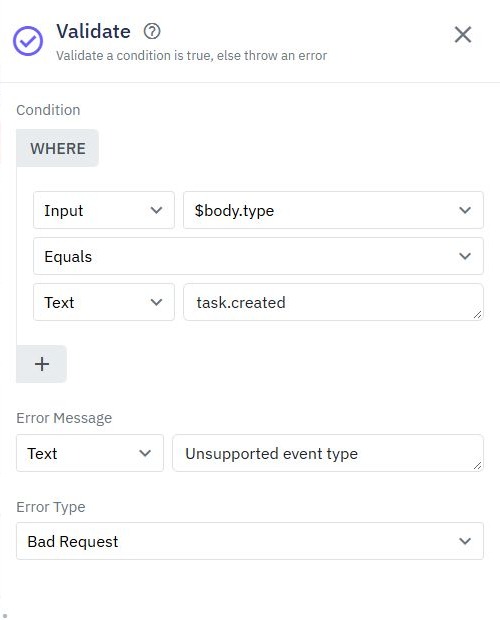
Add Validate in the command builder. Its sidebar has Condition, Error Message and Error Type. For the first comparison value, choose Input and edit the reference to $body.type. Choose Equals; set the second value to Text containing task.created.
Set Error Message to Unsupported event type and select Bad Request as the error type. A false condition throws an error. Place this command before any action that depends on acceptance, such as Save Data. The demonstrated receiver has only validation and an acknowledgement, so there is no write to clean up.
Multiple expressions in a condition must all pass. For alternative allowed values, do not add mutually exclusive equalities as separate required conditions: one value cannot equal two different event types simultaneously. Use the supported expression or branching controls to model your policy and test every branch.
A Condition command helps when valid cases take different paths. Validate helps when the workflow should stop unless a rule holds.
4. Keep success responses and errors distinct
Throw Error accepts an Error Variable. It does not have the same Error Type dropdown as Validate. Use it to throw a configured variable or rethrow a captured error; inspect that variable's contract instead of assuming a string provides a particular HTTP status.
Try Catch handles an exception and exposes a catch error variable. Catch only failures you can handle meaningfully. If a write fails, returning a success object can mislead a frontend into clearing its form even though nothing was saved. Decide whether to recover, translate an error safely or propagate failure.
Output → RESPONSE controls successful HTTP responses. Setting a success status to 400 does not stop invalid workflow execution. Configure success only after validation and the intended operation have completed.
Do not expose database errors, stack traces, tokens or account records as client messages. Keep messages useful without confirming sensitive facts unnecessarily. Check the actual response body and status in the API client before writing frontend code against them.
5. Test the rejected path and database effect
Open Run & Test after editor saves have completed. Set the $body test input to JSON and enter the valid sample. Leave Use live data off, and enable Trace execution before starting a new run. A past run does not gain a trace retroactively.
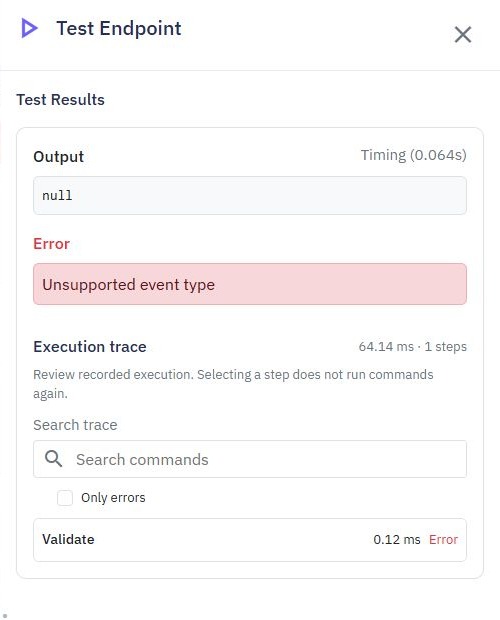
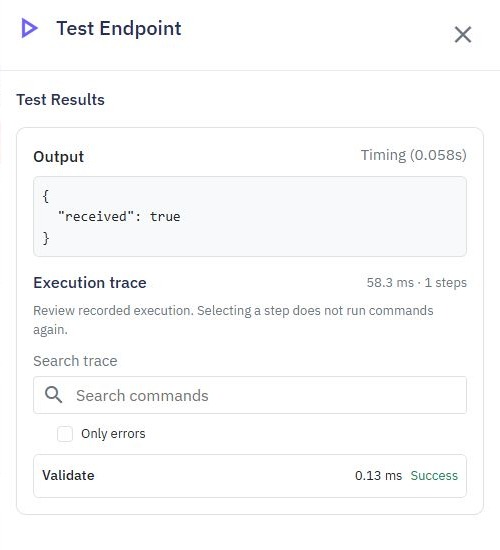
The demonstrated valid event returns {"received":true} with Validate marked successful. Change its type to task.deleted: Validate fails with Unsupported event type and output is null. Omitting type also fails at that condition. This establishes the rule's isolated behavior, without claiming an externally observed HTTP status.
| Case | What to check |
|---|---|
| type: task.created | Acknowledgement and successful validation. |
| type: task.deleted | Validate error and no success output. |
| Missing type | The equality rule rejects the request. |
| Missing event ID | Define and test a separate policy; the type check is insufficient. |
For an endpoint that writes data, test that a rejected request does not execute the write. Isolated tests are the default. Select Use live data only deliberately with disposable records, then inspect the actual table as well as the response. This acknowledgement-only draft does not demonstrate database persistence.
6. Verify the published client experience
Review and publish the endpoint in the intended workspace when the complete policy is ready. Through the API client, send the valid body and each rejection case again. Record the actual HTTP status and safe response body. The demonstrated draft tests do not replace this external HTTP check.
In a form, keep values when a request fails, show an understandable message and re-enable submission. In React, check response.ok; fetch does not treat every HTTP error as a rejected promise. Do not insert server error text as HTML. The React connection guide demonstrates loading and failure states.
Review authorization separately. Valid data is not permission to act: protect private endpoints and derive ownership from authenticated context. Use the authentication guide for sessions and cross-account checks. For a webhook, provider verification and replay handling still need their own implementation. Validation and access layers work together in the API builder, while each has a specific job.
Go deeper
Supporting documentation
Find the configuration details and reference material behind this page.