

1. Choose the event and its contract
A webhook is an HTTP request sent when something happens in another system. Instead of repeatedly asking whether an order changed, your application receives a request when the sender reports the change. The receiving endpoint then decides whether to accept it and what work to perform.
This guide uses a provider-neutral, synthetic event in a dedicated test workspace. It is a receiver-building exercise, not a verified payment, checkout or messaging integration. The sample workflow validates an event and acknowledges it without writing a record or contacting another service.
Use POST /examples/receive-webhook with a JSON body containing text fields event_id and type:
{
  "event_id": "evt_demo_001",
  "type": "task.created"
}
A real sender may require a particular verification challenge, signature, status or response time. Read its current official webhook documentation before adapting this contract. This example does not establish provider authentication or duplicate-event handling.
2. Create the POST endpoint and body inputs
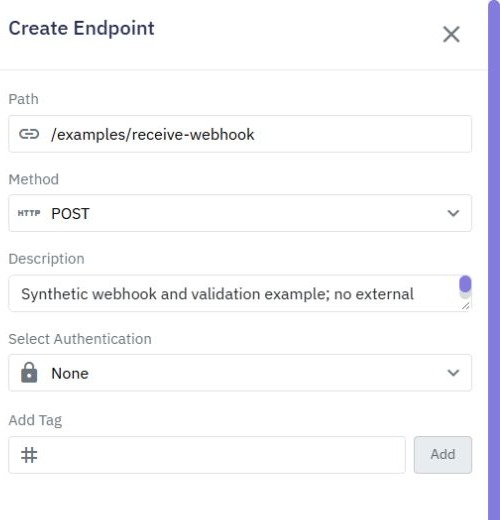
Open API, select Create Endpoint and choose Custom Endpoint. Choose POST, enter /examples/receive-webhook and add a description identifying it as a synthetic sample. When you later publish and call it externally, use the full endpoint URL shown in your workspace; the path alone is not an address.
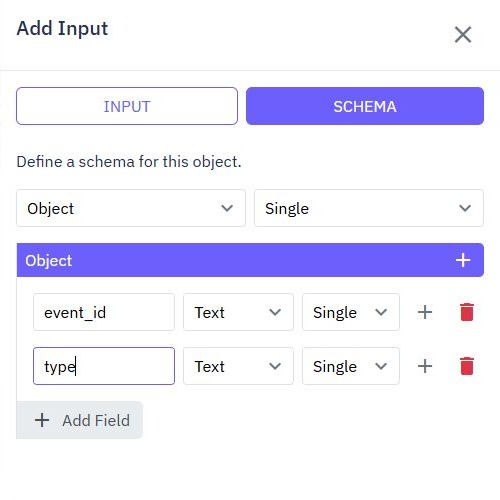
Choose Add Input → Body. This creates one whole-body $body input. In its INPUT tab, enable Required. In SCHEMA, choose Object and Single, then use Add Field to add the text fields event_id and type.
Commands read these fields as $body.event_id and $body.type. Required on the body does not by itself establish that every nested field has the business value you need; add the explicit rule below. A sender using a different field name will need a matching schema and expression.
The REST API guide explains how endpoint inputs and commands fit together. Keep privileged tokens out of URLs and screenshots. Real provider signatures are not equivalent to Twidget customer bearer authentication.
3. Validate before performing any action
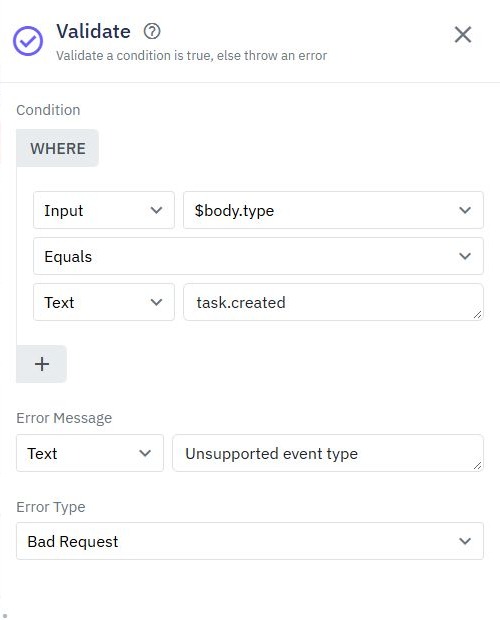
Add a Validate command before any database write or external call. In its Condition editor, choose Input for the first value and enter the reference $body.type. Select Equals, then choose Text for the second value and enter task.created.
Set Error Message to Unsupported event type and Error Type to Bad Request. The sample rejects a different event type or a missing type before reaching its success output. Keep the receiver free of consequential actions until this contract is dependable.
Provider authentication must precede business work. For a signed webhook, establish that the required signature can be checked correctly, including the exact request bytes, timestamp tolerance and secret handling the provider requires. This exercise does not configure or prove signature verification. Do not enable a real provider until that verification has been implemented and tested.
Use the request-validation guide to inspect this rule more closely and design negative tests without confusing a required body with an accepted event.
4. Return a deliberate acknowledgement
In Output, choose JSON and enter a small acknowledgement:
{
  "received": true
}
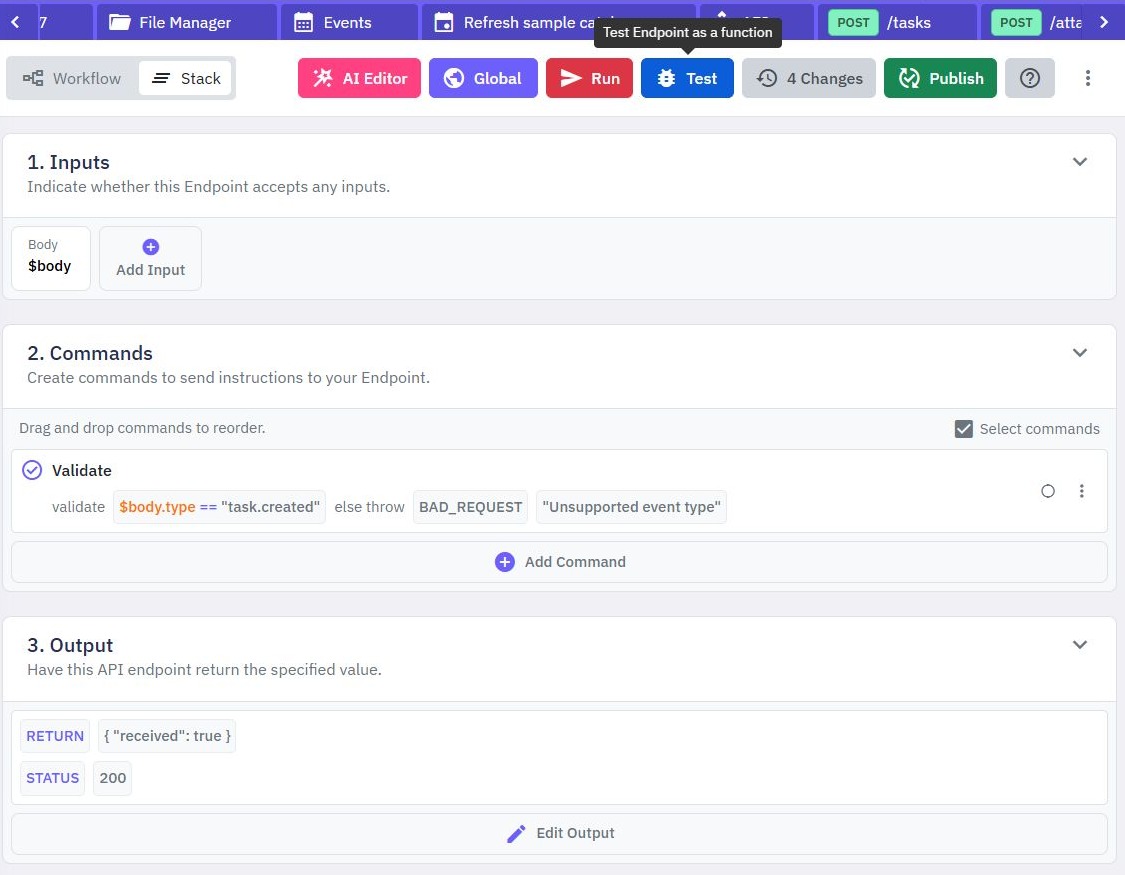
Review the successful STATUS in response settings; the sample uses 200. A successful isolated test checks the workflow's output, not an external HTTP exchange. Publish and inspect the actual HTTP response separately before depending on it in another system.
Only choose 202 when your design intentionally accepts work for later processing; a status number does not create a queue or guarantee delivery. Return success only after the acceptance work your contract promises has completed. This sample acknowledges validation and performs no business action.
Real senders commonly retry failed deliveries, so plan for duplicate event IDs. A read-before-write lookup alone is not a concurrency-safe duplicate barrier. Establish an atomic uniqueness or processing strategy suited to your storage before repeated delivery can trigger payments, emails or other irreversible work. The scheduled-workflow guide covers work started by time rather than an incoming request.
5. Exercise valid and rejected requests
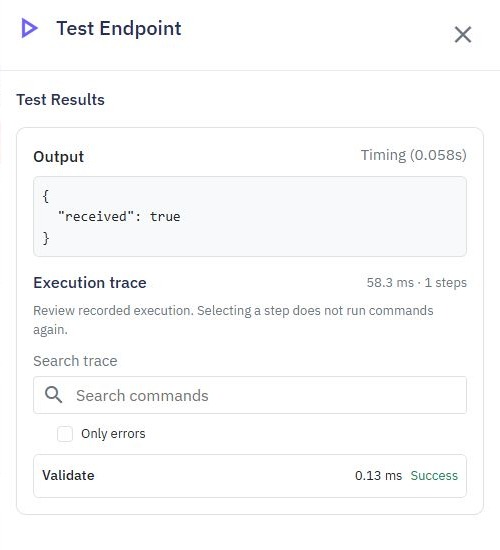
Use Run & Test after the editor has finished saving. Select JSON for the $body test input and enter the sample event. Leave Use live data off and enable Trace execution before starting the run.
For the demonstrated sample, type: task.created produces {"received":true} and a successful Validate step. Change only the type to task.deleted and run again: the result has a Validate error, Unsupported event type, and no success output. Omitting type is rejected by the same rule.
These are isolated builder checks on an unpublished draft. They do not demonstrate an external HTTP 400, real provider delivery, authentication or replay protection. The draft contains no database write or external call.
Before a real release, test malformed JSON, a wrong method, missing body, authentication failures and repeated events through the published endpoint as well. Without duplicate handling, two accepted requests are not proof of exactly-once processing.
6. Review the real sender before connecting it
Before adding this URL to a provider dashboard, compare its delivery contract with your receiver: request method, content type, event envelope, verification challenge, authentication, retry rules and timing. Handle only the event types your workflow understands. Keep credentials out of screenshots and use the provider's test environment where available.
Check request logs with synthetic data, confirm the intended workspace and published version, and verify the database effect separately from the acknowledgement. If a provider reports failure while your manual request succeeds, inspect its exact required headers and payload structure.
Browser CORS settings do not authenticate server-to-server webhook calls. Keep that distinction clear when you later connect a React frontend. The Twidget API builder supports the receiver workflow; a safe integration still depends on the sender's requirements and your acceptance policy.
Go deeper
Supporting documentation
Find the configuration details and reference material behind this page.