

1. Choose a stable event identity
A sender may deliver the same webhook more than once, including when your workflow saved its changes but the sender did not receive the acknowledgement. Checking whether an event exists and then saving it leaves a gap: two requests can both pass the check. Use a database uniqueness rule to arbitrate competing writes.
Start from the webhook receiver guide in a development workspace. This example accepts a synthetic task.created event and creates one task. It covers database changes within Twidget; it does not promise exactly-once emails, payments or other external actions.
{
  "provider": "demo",
  "event_id": "evt_demo_101",
  "type": "task.created",
  "title": "Review launch checklist"
}
Use the provider's documented stable delivery/event identifier. Scope it to the provider or account if it is not globally unique. Keep identifiers case-sensitive unless that provider says otherwise. A timestamp, random ID generated on receipt or hash of an incomplete payload is not a substitute for the sender's event identity. Establish the sender's authentication before trusting those fields.
2. Create a receipt table with a unique key
In Database, create a table such as Webhook Receipts with single-value text fields provider, event_id and event_type. Use a separate test table for the resulting tasks. Keep real payloads and credentials out of this example.
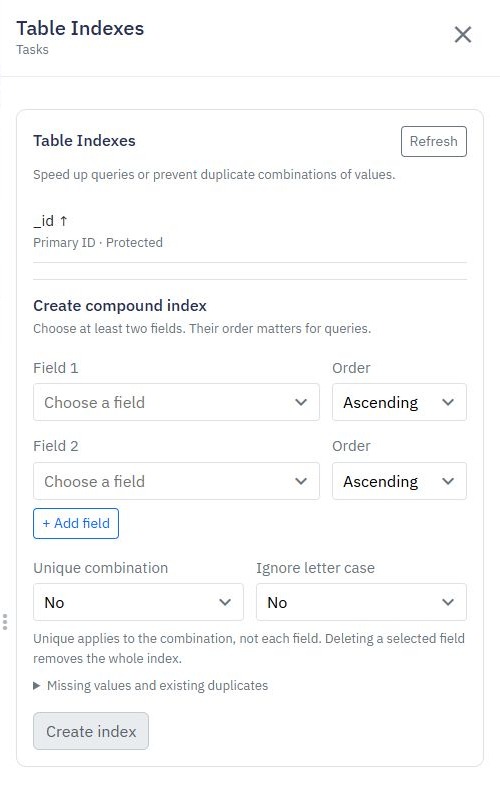
Open the receipt table's options menu and select Table Indexes. Under Create compound index, choose provider and event_id, enable Unique combination and select Create index. Leave Ignore letter case off for this contract. Check that both fields appear together in the resulting index, marked Unique.
For a single globally unique event ID, a unique field index can be sufficient instead. The compound design makes the scope explicit. Existing duplicate records must be resolved before uniqueness can be enabled; creating an index does not clean the data.
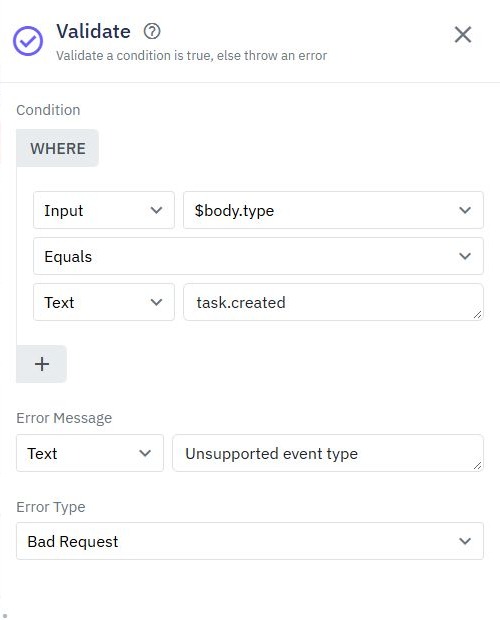
Validate both identity fields as present, non-empty text in the endpoint before a write. Missing, null and empty values have index semantics of their own; they should not become an accidental shared event identity. Follow the request validation guide for business checks.
3. Save the receipt and task in one transaction
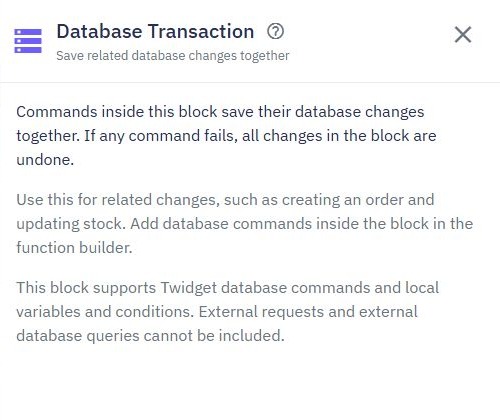
In the receiver, add Database Transaction after authentication and validation. Inside its Save changes together block, put a Save Data command for the receipt and a second Save Data command for the task. Map the validated body values into their corresponding fields. Do not place an email, HTTP request or external database action inside this block.
Validate sender and event fields
Database Transaction
  Save Data → Webhook Receipts
    provider = $body.provider
    event_id = $body.event_id
    event_type = $body.type
  Save Data → Tasks
    title = $body.title
    status = "To Do"
Output acknowledgement
This is an illustrative command plan. Use the editor's variable selector for your actual input references. If the task save fails, the transaction rolls back its receipt as well. If the unique receipt insert fails, the transaction must not leave a new task. Transactions require support in the workspace environment; an unavailable transaction should be treated as a failure, not bypassed with separate writes.
Keep the block short and avoid nested transactions. The unique index controls repeated identity; the transaction groups the two database changes. Neither by itself guarantees that an external service was contacted once.
4. Decide how repeated delivery is acknowledged
A duplicate unique value is reported as a 409 conflict with type UNIQUE_FIELD_CONFLICT. Initially let that conflict surface while testing so you can distinguish it from a successful first delivery. Check the two tables before interpreting a response as proof of safe processing.
A real sender may keep retrying on a non-success response. If its contract expects successful acknowledgement of an already accepted event, handle that case deliberately with Try Catch around the whole transaction. In the catch path, inspect the error, then look up the exact receipt key. Acknowledge only a verified previously committed receipt for this event and contract; rethrow unexpected errors.
Do not convert every database error or every 409 into success. A conflict on a task's own unique field can mean the intended new business change did not happen. Give the receipt table a clear identity rule, inspect the stored event type and decide what should happen if the sender reuses an ID with different content.
The simplest first version can retain the visible conflict while you verify the database behavior. Add provider-specific acknowledgement handling only once its recovery behavior is tested. Return success after the acceptance work promised by your endpoint has completed.
5. Test replay, contention and rollback
Use synthetic inputs and inspect persisted records through a controlled published test endpoint when testing real delivery. An isolated builder run can help inspect command flow, but it is not evidence of simultaneous HTTP delivery. Run the following acceptance checks before connecting a provider:
| Check | Expected database result |
|---|---|
| Send the event once | One receipt and one task |
| Send the identical event again | Still one receipt and one task |
| Send a different event ID | A second receipt and task |
| Submit the same key concurrently | At most one committed receipt and associated task |
| Force task validation to fail inside the transaction | No receipt or task from the failed transaction |
| Omit event_id | Rejected before attempting the receipt save |
These are acceptance criteria, not a claim that all provider and concurrency tests have been performed for your deployment. Capture the HTTP statuses, final counts and failed command. A single serial replay does not establish what happens under contention.
After a simulated failure, restore the correct input and replay that event ID. It should be able to succeed if no receipt committed. If a receipt remains without its intended task, review the transaction boundaries before continuing.
6. Keep external side effects and recovery explicit
A successful database transaction followed by an email failure leaves the receipt committed. On replay, the receipt prevents the database work from happening again, but it cannot automatically recover that email. Conversely, sending an email before committing risks sending it for work that later rolls back.
For integrations requiring external delivery, design a durable pending-action record, a worker and an explicit retry policy. Use the destination's idempotency support where available and record delivery status. That is an additional workflow, not a guarantee supplied by this receipt example. Preserve enough information to investigate uncertain results without storing unnecessary personal data.
Database change workflows can start internal follow-up work after a committed change, but their best-effort delivery still needs monitoring and recovery. Use scheduled workflows for deliberate periodic reconciliation. The API builder provides the receiver and database commands; safe recovery depends on the full contract you choose.
Go deeper
Supporting documentation
Find the configuration details and reference material behind this page.