
1. Match the status to the completed work
A response status is part of the contract your frontend or integration consumes. Start with a synthetic endpoint whose output you understand. Twidget lets you configure successful response status and additional headers in the endpoint Output editor. Error responses retain their own status; choosing a success status does not replace validation or error handling.
| Status | Use when your workflow establishes this result |
|---|---|
| 200 | The operation succeeded and may return a body |
| 201 | A new resource was created |
| 202 | Work was accepted and completion is still pending |
| 204 | The operation succeeded with no response body |
Returning 202 does not itself create a queue or run work asynchronously. Only use it when your implementation supports that behavior.
2. Set the successful response in Output
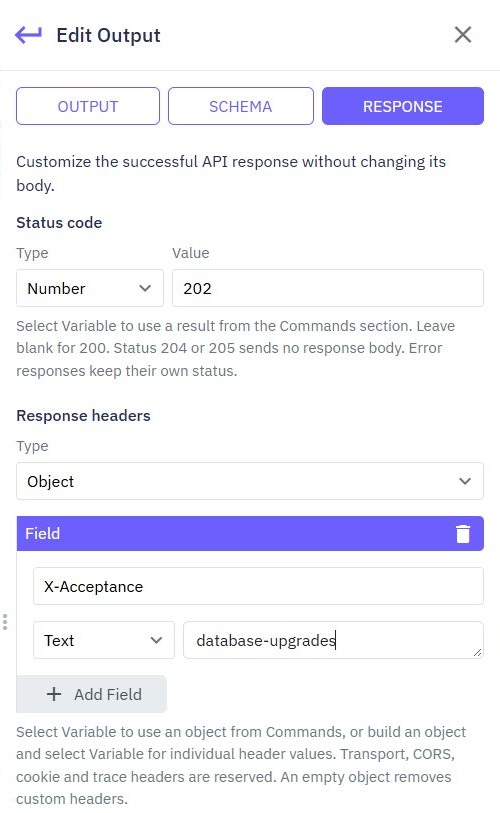
Open the endpoint's Output editor, select RESPONSE and choose the intended status. The documented default when left blank is 200. If a command variable controls the status, inspect every possible value and establish a safe contract for each branch.
For a create endpoint returning 201, map an explicit safe result containing the created record's identifier. Do not pass through the entire authentication record or internal command output. Use the CRUD guide to review generated inputs and output before adapting them.
3. Add only the headers your client needs
Add a response-headers object in the same editor. A harmless example is {"X-App-Revision":"sample-v1"}. A dynamic value can reference a workflow variable, but it must not contain secrets, bearer tokens or internal exception details.
Some headers, including cookie, browser-access and tracing headers, are reserved here. Use the appropriate API settings for browser access rather than trying to override them through this object. For a frontend integration, check the browser request and CORS workflow. Custom headers do not automatically make a browser response readable.
4. Make the body agree with the status
For 200 or 201, define the exact fields the client needs. For 204 and 205, do not expect a response body. A client that always calls JSON parsing will fail on a successful empty response. Either handle that status before parsing or return a suitable body-bearing status for your chosen contract.
A failure must not look like a successful empty list. Use validation and the workflow's error handling for denied or invalid requests. The validation guide covers those branches; changing a success status alone is insufficient.
5. Inspect the actual HTTP response
Save, test and publish the endpoint. In the API client, call its published path with synthetic input and inspect status, headers and raw body. A successful isolated command test does not establish the published HTTP contract. Watch the API client tutorial for request setup.
Verify a successful creation, a validation failure, a denied request and an empty-body success if used. Confirm the error branches keep appropriate errors and never inherit a misleading success status. If a header is missing, check reserved-header rules, output mapping and published state.

6. Update clients before changing an established contract
List consumers that assume status 200 or a JSON body before switching a live endpoint to 201 or 204. Update their success handling and regression tests deliberately. An HTTP-correct change can still break a client that was written against the old response.
Use API workflow tests to cover the complete create/read journey, and review changes in Dev-to-Prod promotion. The status should describe the operation you have verified, not a future step the workflow has not performed.
Go deeper
Supporting documentation
Find the configuration details and reference material behind this page.