

1. Prepare a disposable database and read account
Twidget’s External Database Query command reads records through a saved connection. You do not need to import the whole dataset into Twidget. This guide describes a PostgreSQL order lookup; it does not claim that the example database has been provisioned or that a successful live PostgreSQL connection has been demonstrated here.
You need a suitable test PostgreSQL instance, permission to connect it and a database account restricted to the tables and read operations needed. Ask the database administrator for the secure hostname, port, database and credentials. Do not connect a customer production database as a shortcut for a tutorial, and do not disable network or sign-in protections to make a connection succeed.
The sample query assumes an orders table with id, customer and amount. An administrator can prepare synthetic rows such as Avery/10, Blake/20 and Casey/30. These names and amounts are illustrative fixtures. Use the real column types from your test schema before configuring input validation.
If you need Twidget-managed storage instead, follow the table-backed CRUD guide. This external connection reads PostgreSQL; it is not a write connector or an automatic migration.
2. Save the workspace connection
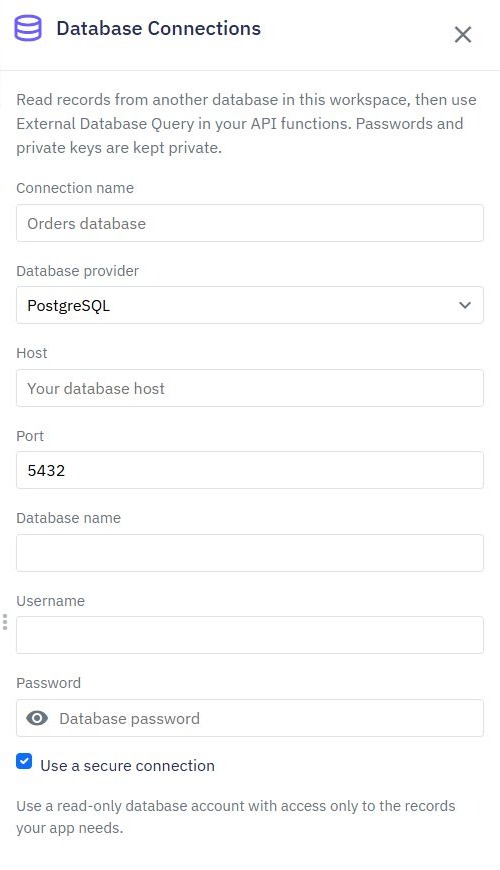
Open Settings → Database Connections, choose Add database connection and select PostgreSQL. Enter a descriptive connection name and the administrator-supplied host, port, database name, username and password. Keep Use a secure connection enabled and save.
A saved configuration is not proof of connectivity. The standard runtime restricts local-only and private network destinations; localhost would refer to the remote runtime, not your laptop. Arrange a permitted secure destination with the administrator rather than exposing the database indiscriminately. Confirm the provider’s certificate and network requirements before testing.
Credentials belong in the saved connection, not endpoint query inputs, frontend environment variables or screenshots. Saved passwords are not shown back in the connection list. When editing, leaving the password blank retains the stored password. Connections belong to their workspace, so copied workflows need an appropriate connection in the destination as well.
3. Use a parameterized read query
Create a custom GET endpoint such as /examples/external-orders. Add a Number query input named minimum_amount, then add Validate rules for the range and numeric policy appropriate to your application. A number used for a monetary threshold may allow decimals; do not apply an integer rule merely because the pagination example does.
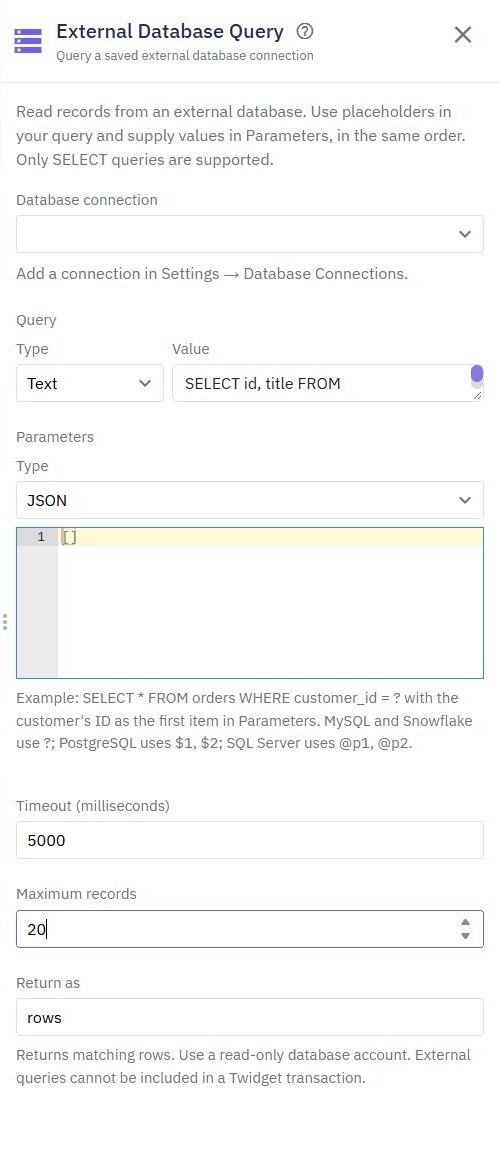
Add External Database Query and select the saved Database connection. Enter this read query, adapting identifiers to your verified schema:
SELECT id, customer, amount
FROM orders
WHERE amount >= $1
ORDER BY id
In Parameters, supply a list whose first value comes from $queries.minimum_amount. PostgreSQL uses positional placeholders $1, $2 and so on. Match the list order to those positions. Do not place quotes around the placeholder or insert the input into the SQL string.
Parameters represent values, not arbitrary table names or SQL fragments. Keep identifiers fixed in the reviewed query. The maintained connection documentation describes provider-specific placeholder differences; copying another provider’s syntax can change the result or fail.
4. Bound execution and select the response
Set Timeout (milliseconds) to a deliberate value such as 5000 and Maximum records to 10 for this small exercise. Set Return as to external_orders, then use that variable in the endpoint output. These are example settings, not a performance guarantee.
Return only the selected columns. Do not use SELECT * when the application needs three fields, especially if a later schema change might expose internal information. Review actual returned types: PostgreSQL drivers can represent decimal amounts as text. Adapt the client contract deliberately instead of silently treating all amounts as JavaScript numbers.
This query’s threshold is a filter, not customer authorization. Protect a private endpoint and add a server-derived customer predicate when orders belong to different customers. The ownership guide explains that boundary. The external account’s read-only grants reduce its authority but do not decide which caller may read each returned order.
5. Test the connection and failure cases
With the disposable database available, run the query with a threshold of 20. For the illustrative three-row fixture, expect Blake and Casey in ID order. Raise the threshold above 30 and expect an empty list. Compare IDs and values with the database directly; an empty result is meaningful only after you know the connection and fixture are correct.
Try an invalid numeric input and confirm that validation rejects it before execution. Test a SQL-like string as the parameter: it must not change the query structure. Exercise an unavailable destination or deliberately failing query only on your disposable connection, then confirm the client receives an appropriate failure and no database credentials or raw internal connection details.
Timeout and result-limit failures should remain failures. Do not catch an unavailable database and return a successful empty array; the frontend would confuse missing data with an operational problem. Enable execution tracing for diagnosis while avoiding confidential query values in screenshots.
These are required acceptance checks before relying on the integration. A picture of the settings panel alone establishes neither successful TLS negotiation nor a verified returned dataset.
6. Publish after the database checks pass
Review the endpoint’s authentication, selected fields, bounded result and error behavior, then publish the reviewed workflow. Call its full URL through the API client and repeat a valid query, empty result and database failure. Confirm the published endpoint uses the intended connection in the intended workspace.
If connection fails, separate hostname/network reachability, authentication, certificate requirements and query permissions. If the query runs but values are wrong, inspect parameter order, database schema and returned types. External reads cannot be included in a Database Transaction for Twidget’s own tables; do not present a combined external read and internal write as one atomic transaction.
Connect the verified read contract to a React frontend or a database dashboard. The backend page provides the broader workflow, while the connection documentation covers the supported external-database boundary.
Go deeper
Supporting documentation
Find the configuration details and reference material behind this page.