

1. Define the owner field and test accounts
Use this guide after the signup and login flow is working. Customer authentication for your application is separate from your Twidget dashboard login. Prepare two synthetic customer accounts, A and B, in the existing authentication table, plus disposable task records. Keep their passwords and tokens out of screenshots and documentation.
Add a text field named owner_id to the tasks table. It stores the authenticated customer’s _id. Each private task has one owner in this example; shared projects and administrator access need separate, deliberate policies. This field is an application rule, not an automatic table-wide access control.
Use a clearly separate route family such as /private-tasks. Protect list, create, read, update and delete endpoints. Do not leave the same table available through an older unrestricted CRUD endpoint. Review existing paths, page functions and related-record outputs as part of the access boundary.
2. Read the identity from verified authentication
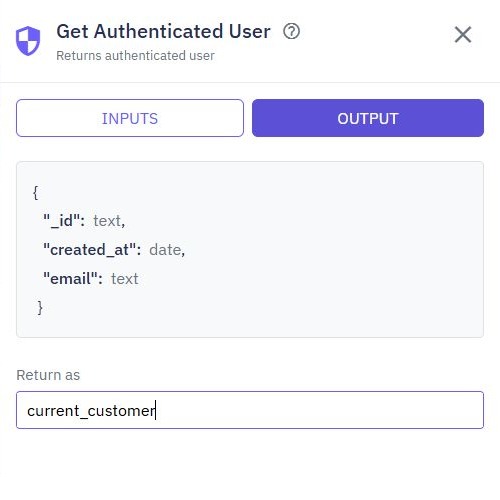
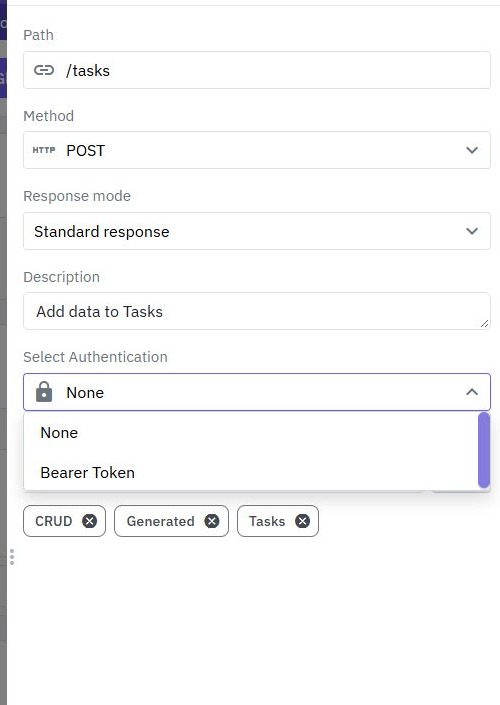
Require bearer authentication on each private endpoint. At the beginning of its workflow, add Get Authenticated User and set the returned variable to current_customer. The command returns the verified customer object, including _id. Use the variable picker to reference current_customer._id in later commands.
Do not derive the owner from $body.owner_id, a query parameter, a hidden form field or a client-decoded token. Those values can be changed by the caller. The authentication layer must verify the token before the workflow treats its customer identity as trusted.
A protected endpoint must reject a request without valid authentication. An anonymous isolated builder run does not establish that a customer has been authenticated; use an appropriate authenticated request for the actual access check. Do not switch an endpoint to public merely to make a test return data.
The backend overview explains how endpoints and customer accounts fit together. Bearer authentication supplies identity; the database predicates below supply the task-level permission decision.
3. Scope list and create operations
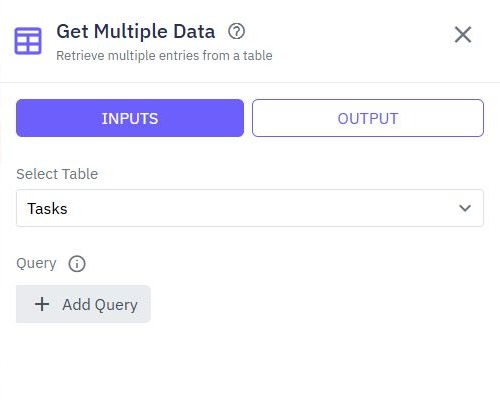
For the list endpoint, add Get Multiple Data with a Query requiring owner_id to equal current_customer._id. Combine any status filter with this ownership expression using AND. Bound the output with the pagination pattern and return only the fields the interface needs.
For create, accept only editable task inputs such as title and status. Build the object supplied to Save Data explicitly and assign its owner_id from current_customer._id. Do not save the caller’s entire body and then hope an owner field is harmless.
{
  "title": "Review the launch checklist",
  "status": "To Do"
}
This is the illustrative public request body; the backend adds ownership. Send the same request with an extra forged owner_id during testing. The workflow must either reject the unexpected field or ignore it while storing the verified caller’s ID. Inspect the saved synthetic record to confirm the result.
4. Apply ownership to read, update and delete
For GET /private-tasks/{task_id}, use Get Data with both _id = $path.task_id and owner_id = current_customer._id joined by AND. A matching ID alone is insufficient. If nothing matches, return the deliberate not-found outcome rather than returning another account’s record or an entire empty-looking account object.
Apply the same combined predicate directly to Update Data and Delete Data. A separate earlier read is not a replacement for a scoped mutation. Construct updates from the allowlisted editable fields; exclude owner_id and _id. Treat ownership transfer as a separate privileged operation if you ever add it.
Decide the no-match behavior consistently. A not-found response for both nonexistent and inaccessible records avoids revealing whether another user’s ID exists. Verify the command’s returned result and configure the response accordingly; do not report “updated” or “deleted” merely because the workflow reached its end.
Use the related-table guide when a task references a project. Checking access to a task does not automatically authorize every record included in its response.
5. Test the access matrix with two accounts
Create one task as A and another as B. Keep tokens local to the API client, then run this matrix against the published test endpoints. The outcomes below are acceptance criteria, not a claim that every generated endpoint already enforces them.
| Request | Required outcome |
|---|---|
| A lists tasks | Only A’s records appear |
| B reads A’s task ID | No task data is returned |
| B updates A’s task ID | A’s stored task is unchanged |
| B deletes A’s task ID | A’s task still exists |
| A forges B’s owner ID on create | Rejected or stored under A |
| No bearer token | Authentication rejects the request |
Also test A’s successful read and update, an unknown ID, a malformed ID and a deliberate owner-field update attempt. Verify stored state after each rejected mutation. A generic error response alone does not prove that a write did not happen.
Repeat checks for any bulk or search route you expose. A secure single-record route does not compensate for an unscoped list endpoint. Keep a small repeatable set of access checks when editing the workflow later.
6. Review outputs and existing access paths
Inspect output fields and logs for unnecessary account data. Never return password hashes, reset fields or bearer tokens as part of a task response. A frontend hiding an edit button improves usability but does not enforce permission; requests can be made without that frontend.
If B sees A’s task, check that the owner predicate is in the actual database command, joined by AND, and refers to the authenticated-user variable. If nobody can see their own tasks, compare stored owner IDs with the verified account’s ID and check that legacy records have been assigned an intentional owner. Avoid bulk-assigning unknown records to whichever user first opens them.
Publish the reviewed version and repeat the matrix through the full endpoint address. Continue with account recovery to review expired credentials, or add input validation without weakening the ownership predicate.
Go deeper
Supporting documentation
Find the configuration details and reference material behind this page.