
Choose how you want to express the application
Evaluate Twidget when explicit API endpoints and visual command workflows are central to your app, alongside pages connected to those operations. Evaluate Bubble when its visual design and event/action model match the way you want to build and maintain the app. Both approaches require you to design data relationships, permissions and error handling.
Official sources were checked on . The portal below is a shared evaluation task; we are not reporting a timed or independently tested build in Bubble. Explore Twidget's web app builder and the official documentation beside each comparison point.
Use the same private customer portal as the trial
Build a portal where a customer signs in, creates a service request, sees its status and opens its details. Staff may update status and add a private internal note. Include a second customer with a different request so you can prove that one account cannot retrieve the other's records.
Keep the scope small: a request title, description, status and owner, plus separate internal notes. Use synthetic data and write the success criteria before generating or arranging the interface. The Twidget customer portal guide provides that sequence without requiring a billing or payment integration.
1. Compare the layout and editing process
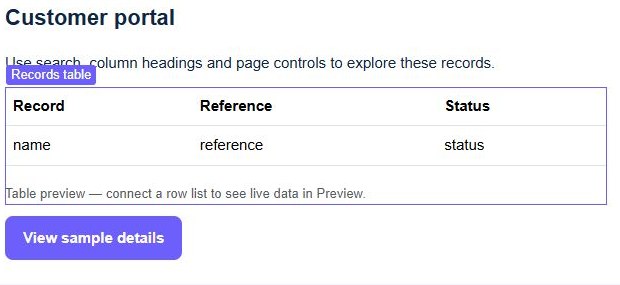
In Twidget, a customer-portal starter can create a disabled page draft with synthetic records for layout review. Inspect its list, details and form before replacing demonstration data with authorized endpoint calls. Page preview proves what the configured interface displays; it does not establish customer isolation.
Bubble's design documentation describes a visual canvas with interface elements and responsive layout controls. It also documents AI-assisted design. If your app has a distinctive public-facing interface, reproduce one representative screen in the editor and adjust it at narrow and wide widths before committing to the platform.
For either builder, test a long request title, a validation error, no matching results and a failed load. Check keyboard access and whether the page remains understandable on a phone. A generated first screen is only the beginning of the design evaluation.
2. Put private data rules on the server
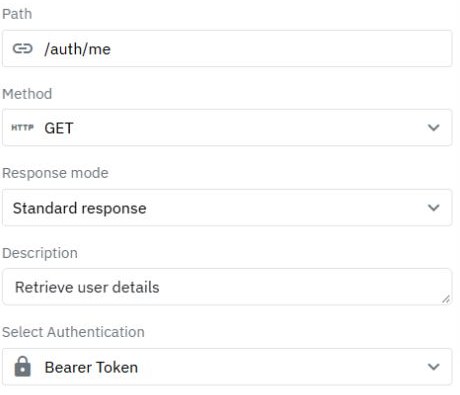
In Twidget, protect the request endpoints and derive the customer identity from the authenticated session. Filter lists by that identity and check ownership again on detail and write operations. Return only customer-visible fields. Follow user-specific API data and separate staff permissions to make those decisions explicit.
Bubble uses privacy rules on data types to control what the server allows a user to access. Its documentation explains why data sent to the browser can be inspected even if the page does not display it. Configure these rules for the portal's data and review write authorization for each action.
Try the same negative test in both apps: sign in as customer A and request customer B's known valid record ID. Inspect the returned data, including internal notes. Then test without a session. A successful login and a hidden row are insufficient evidence of isolation.
3. Follow one action from form to saved result
For Twidget, connect the request form to a protected endpoint. Validate its fields, assign the owner from the session, save the record and return an allowed response. In the page, reload the authoritative list after success and retain the user's input if saving fails. The request-validation guide explains the backend boundary.
Bubble models workflows as events and actions, including page events, database changes and account actions. Recreate the same submission journey, including a validation failure and a failed operation. Follow the dependencies between steps rather than assuming the browser's confirmation means every downstream action completed.
Change one requirement during the trial: let staff request more information while customers can only add a reply. Locate the permission rule, state transition and interface feedback. This maintenance task helps you judge whether the model remains understandable after the first prototype.
4. Compare incoming and outgoing API work separately
Twidget exposes configured endpoints that another frontend or external client can call. Inputs, command sequences and outputs are part of the endpoint definition. Explore the API builder and REST API guide when an external consumer is part of your requirements.
Bubble's API Connector configures outgoing calls as actions or data sources. Its API workflow documentation separately covers exposing backend workflows to incoming requests and configuring their authentication. These are distinct directions of integration.
Use one specific provider and one specific external caller in the trial. Check headers, accepted inputs, returned fields, authentication failures and repeated requests. Keep service credentials out of browser-visible code, and verify the selected tool's configuration for storing secrets. An integration's existence does not establish that your provider's required flow is covered.
Decide which approach and operating model fit
Bubble deserves a close trial when you want to work primarily in its visual design, data and event/action model. Its documented UI tools and outbound API configuration may suit the portal you are building. Twidget deserves a trial when you want explicit backend endpoint workflows as well as connected browser pages, including the option of calling those endpoints from another frontend.
Read Twidget pricing and Bubble pricing using the same expected activity. Bubble measures server resource use in workload units; its pricing page explains included workload and additional tiers. Record app type, expected traffic, data operations, editor access, environments and paid integrations. Test representative usage before extrapolating a monthly bill.
Confirm export, recovery, support and any contractual requirements directly with the provider. Avoid assuming that either platform can export a complete runnable application merely because data can be retrieved through an API.
Finish with evidence from a real user journey
Before deciding, show that customer A can create and reopen their request, customer B cannot retrieve it, staff-only fields stay private and a failed save leaves the form recoverable. Repeat the checks against the intended published version and record what another maintainer needs to change the app.
The portal guide connects Twidget's pages and backend, while API journey testing helps turn access and validation rules into repeatable checks. Choose the system whose application model your team can explain, test and maintain for the work ahead.
Go deeper
Supporting documentation
Find the configuration details and reference material behind this page.